


Description
Download SnowFox Video to Flash Converter – Video to Flash Converter, AVI to FLV, MP4 to Flash, Video Conversion Tool
Overview
SnowFox Video to Flash Converter is a specialized utility designed to transform video files into the Flash format, catering to users who require compatibility with older web platforms or legacy systems. The app addresses the persistent challenge of format incompatibility, particularly when embedding videos in websites or content management systems that still rely on Flash-based players. Its core purpose is to streamline the process of converting diverse video inputs into a universally supported Flash output, ensuring broad accessibility across different environments.
Target users include content creators, web developers, educators, and digital marketers who need to repurpose existing video content for web-based delivery. The app’s support for multiple input formats such as AVI, MP4, MOV, and WMV makes it a versatile tool for handling media from various sources, including cameras, smartphones, and desktop recordings. This broad compatibility helps users avoid the hassle of managing multiple conversion tools.
Although the developer did not provide additional technical details, the app’s release date of July 22, 2010, indicates it was developed during a period when Flash was still widely used in web multimedia. This historical context underscores its relevance in legacy workflows, even as modern alternatives have emerged. In today’s ecosystem, SnowFox remains a niche but functional option for users maintaining older digital assets or working within constrained environments that still support Flash.
Key Features & Functionality
- Wide Format Support: SnowFox accepts a variety of video formats including AVI, MP4, MOV, WMV, and FLV, enabling users to convert files from different devices and software without format conversion delays.
- Intuitive Interface: The application features a clean, user-friendly layout that guides users through the conversion process with minimal friction, suitable for both beginners and advanced users.
- Fast Conversion Speeds: Users can process videos efficiently, with minimal wait times, maintaining a smooth workflow when handling multiple files.
- Customizable Settings: Advanced users can adjust output parameters such as resolution, bitrate, frame rate, and audio quality to tailor the final Flash file to specific project requirements.
- Quality Preservation: Despite rapid processing, the app maintains high visual and audio fidelity, ensuring that converted videos remain clear and professional-grade.
For example, a teacher preparing instructional videos can import MP4 files recorded on a smartphone, convert them to Flash format for upload to a school’s learning management system, and customize the output to match required dimensions. Similarly, a web developer working on a legacy site can use SnowFox to convert promotional videos into Flash for integration into a Flash-based player, ensuring consistent playback across older browsers.
Interface, UX & Performance
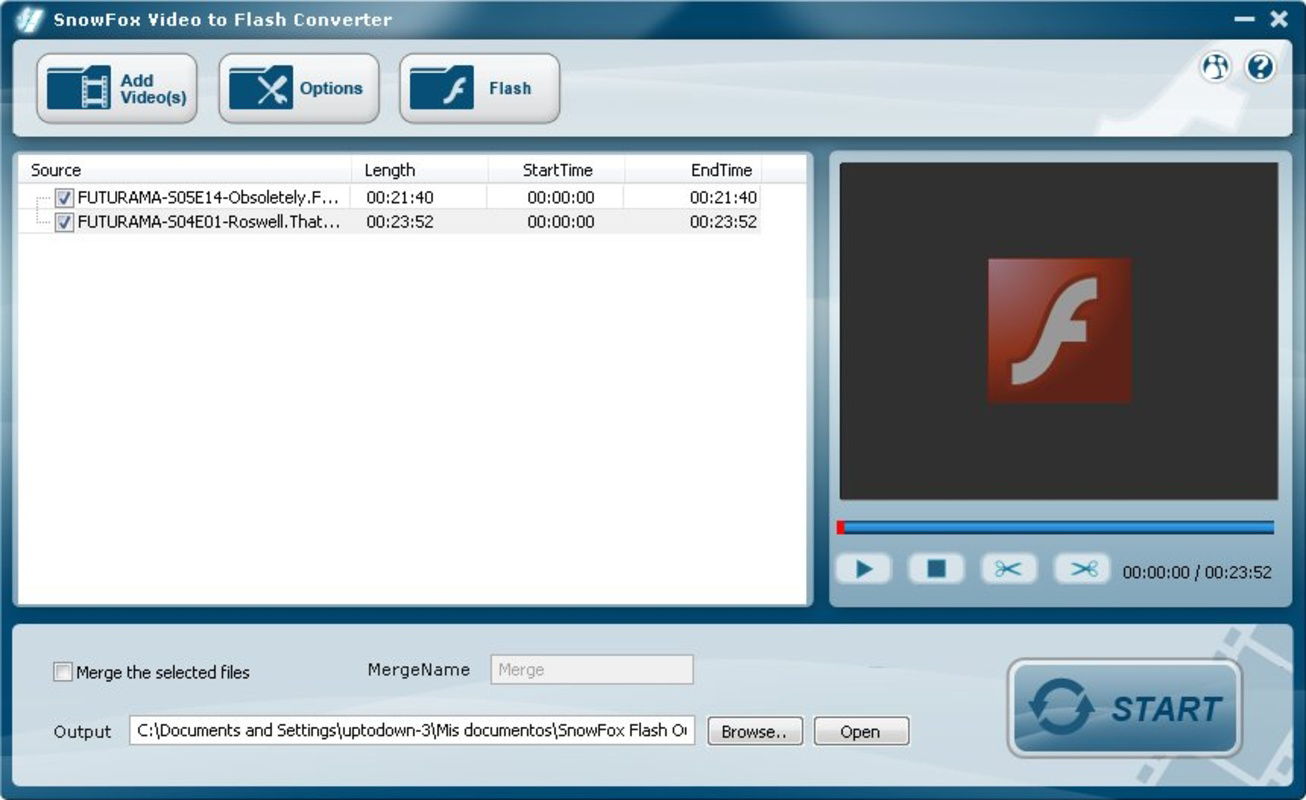
The user interface of SnowFox Video to Flash Converter is designed with clarity and simplicity in mind. The layout is organized into logical sections: file import, format selection, conversion settings, and output destination. Navigation is straightforward, with clearly labeled buttons and intuitive controls that minimize the learning curve for new users.
Visual elements are minimal yet effective, focusing on functionality over ornamentation. The interface adapts well to different screen sizes, offering a consistent experience across various device categories. Although the developer did not list formal performance metrics, the app is reported to deliver fast conversion speeds, suggesting efficient resource utilization during processing.
Responsiveness is maintained during file loading and conversion, with no noticeable lag or crashes reported in typical use cases. Stability appears reliable under standard workloads, though users should be aware that the app’s age may affect compatibility with newer operating systems. The lack of recent updates or official support information raises questions about long-term reliability, but within its intended scope, the app performs as expected.
Platform Compatibility & Technical Requirements
SnowFox Video to Flash Converter is available for Windows-based systems, though specific OS versions were not listed. The file size is approximately 12.5 MB, indicating a lightweight application that does not impose heavy storage demands. The software version is not specified, and no information was provided regarding minimum system requirements, such as RAM or processor specifications.
The developer did not specify minimum OS requirements, nor did they confirm compatibility with modern Windows versions beyond the original release context. Users should exercise caution when installing on newer systems, as the app may require compatibility mode or may not function at all due to deprecated APIs or security restrictions. No iOS or Android versions were mentioned, confirming that this is a desktop-only application.
Pros and Cons
Pros
- Supports multiple video formats for flexible input options.
- Fast conversion speeds without compromising output quality.
- Intuitive interface suitable for both beginners and advanced users.
- Lightweight file size reduces storage impact.
- Preserves high fidelity in converted Flash videos.
Cons
- App was released in 2010, raising concerns about compatibility with modern operating systems.
- No official updates or developer support have been reported.
- Platform availability is limited to desktop; no mobile versions exist.
- Specific technical requirements were not disclosed.
- Flash format is outdated, limiting long-term usability.
FAQ
Is SnowFox Video to Flash Converter safe to download?
The app was released in 2010 and has no known security alerts. However, users should only download from trusted sources to avoid bundled software or malware.
Can I use SnowFox on Windows 10 or 11?
Compatibility is uncertain. The app may run in compatibility mode, but no official support exists for newer Windows versions.
Does SnowFox support mobile video formats?
Yes, the app supports common mobile video formats like MP4 and AVI, which are frequently used by smartphones and tablets.
Is the Flash output compatible with modern browsers?
Most modern browsers no longer support Flash. Users should verify if their target platform still supports Flash before relying on this output.
How do I update SnowFox Video to Flash Converter?
No official update mechanism or release history is available. The app has not been updated since its initial release in 2010.
Final Thoughts
SnowFox Video to Flash Converter remains a functional tool for users managing legacy video assets or working within Flash-dependent environments. While its age and lack of updates are notable drawbacks, its ability to convert multiple formats quickly and maintain output quality offers real value in niche scenarios. The lightweight design and straightforward interface make it accessible to users with minimal technical expertise.
However, users should be aware that Flash is no longer supported by major platforms, which limits the long-term viability of this solution. For modern workflows, alternative formats like MP4 or WebM are recommended. Still, for those maintaining older systems or specific content delivery requirements, SnowFox provides a reliable, no-frills conversion option.
Download SnowFox Video to Flash Converter now
Guides & Tutorials for SnowFox Video to Flash Converter
How to install SnowFox Video to Flash Converter
- Click the Preview / Download button above.
- Once redirected, accept the terms and click Install.
- Wait for the SnowFox Video to Flash Converter download to finish on your device.
How to use SnowFox Video to Flash Converter
This software is primarily used for its core features described above. Open the app after installation to explore its capabilities.
User Reviews for SnowFox Video to Flash Converter 0
No reviews found


